AdvanceVoxels
Hero Mode added!
Hero mode: climb into any of your units and fight the battle yourself
You've built the city, trained the army, called the airstrike. Now you can take the controls of one of your own units and change the fight with your own hands — in third person, with a crosshair in the middle of the screen, Battalion Wars style.
It's a new stratagem on the bar at the top of the screen, next to Airstrike and Overdrive: [H] HERO. Choose it, click one of your ringed units, and you're in.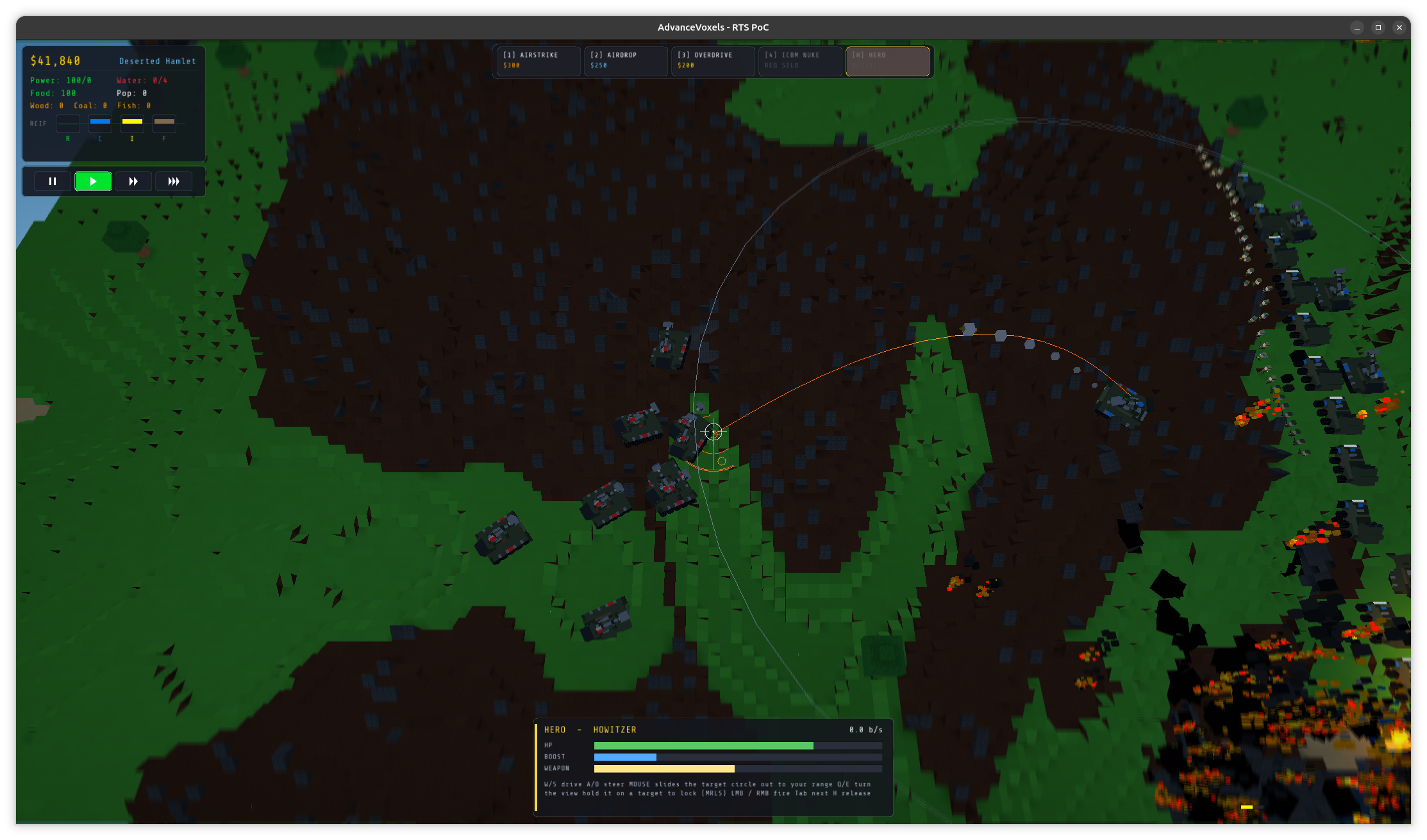
🎮 What you can take over
Every fighting unit and every aircraft: riflemen, grenadiers, rocket soldiers, tanks, medium tanks, humvees, scout trykes, howitzers, rocket launchers, fighters and bombers. (Trucks and civilians stay on the job.)
On foot you move like a shooter: W toward the crosshair, A/D to strafe, Space to jump — a jump is high enough to clear a two-block wall that stops a walking soldier. Shift sprints.
In a tank or a humvee you drive with W/S and steer the hull with A/D, and the turret is independent of the hull. The mouse swings the gun round to the crosshair, it takes a moment to traverse (heavy guns are slower), and it won't fire until it's actually pointing where you're aiming. A small ring shows where the barrel really is, so you can see the gap close. A machine gun follows you from nearly straight up to well below level — handy for the plane overhead or the soldier at your tracks.
In a howitzer or a rocket launcher the view goes high above the battlefield and the mouse slides a target circle across the ground, all the way out to your weapon's reach. The circle is sized to the blast, so you see exactly where the shells will come down, with a ring for your range and the arc of the shot.
✈️ Flying
This is the part we're proudest of. Aircraft have a proper — if small — flight model:
- W dives, S climbs, A/D bank, and the bank turns the plane. It can't sidestep.
- Q/E is the rudder. Shift is an afterburner with a limited charge, Ctrl an air brake. Dive and you speed up; climb and you slow down.
- There is no terrain avoidance. Fly into a building and the plane is a kamikaze: the blast is scaled by how fast you hit it, and it does real damage to the building you struck. A "PULL UP" warning flashes if you get low. Please use responsibly.
- The sight is on the nose, in the middle of the screen. The camera rides behind it.
🎯 Missile lock
A missile fired straight ahead misses anything that's moving, so aircraft get a lock-on seeker. Hold a target in front of your nose and the seeker starts to acquire it: you'll hear blips that speed up as the lock firms, then a steady tone when you're locked, and see a bracket close in on the target before it turns into a red diamond. A missile fired on a lock chases the unit.
Rocket launchers can lock too — hold the target circle on a moving tank and the rockets will follow it.
⏱️ One use, then it reloads
Hero mode is a stratagem, so it has a cost to it: it's free, but single-use. The charge is spent when you pick a unit and the 60-second reload starts when you let go (press H again) or lose the unit — not while you're flying. Tab hops to your next unit during a session. While you're in a unit the build menu is tucked away, so the only things on screen are your status panel and your sights.
🖼️ A tidier screen
Hero mode was the excuse to go through every panel in the game. Several used to sit on top of each other at smaller window sizes — the stratagem bar ran under the city stats, the build dock overlapped the bulldoze buttons, the wave banner and the milestone banner drew over one another. The HUD now fits itself to the window: the dock narrows, the stratagem bar shrinks and shortens its labels, and banners stack instead of overlapping. We check it by drawing the real HUD at eight window sizes, from 1920×1080 down to 960×540.
⚠️ What to know
- Hero mode is single-player only for now. In a multiplayer match it's disabled: the controls would have to travel to the host, and a hero only the host could use wouldn't be fair. It's something we want to do properly.
- It's brand new. The handling numbers — plane speeds, turn rates, camera distances, mouse sensitivity — are our best first guess, and we'd love to hear what feels wrong.
- Controls are in the README, and the on-screen panel lists them for whatever you're flying.
Tell us what you flew, what you blew up, and which plane you flew into which building.
Leave a comment
Log in with itch.io to leave a comment.